Haitian Creole Has One Accent Mark in Standard Orthography
Standard Haitian Creole orthography uses only the grave accent mark. It looks like a small line that slants to the left: (`).
This lesson will show you how to pronounce letters with the grave accent mark.
You will also learn how to type the grave accent mark on a physical keyboard or a touchscreen.
How the Grave Accent Mark Works
- In standard Haitian Creole spelling, the grave accent mark appears on the letters a, e, and o.
When the grave accent mark is placed above those letters, they look like this: à, è, ò.
Continue reading below to see how to pronounce them.
- Focus mainly on the accented letters è and ò.
The accented letter à is very rare in standard Haitian Creole spelling.
In standard spelling, à is usually seen in the combination àn. (See the first example below.)
How to Pronounce Haitian Creole Accent Marks
1. Àn - sounds roughly like the vowel in the English name Ann.
2. È - sounds roughly like the e in Get.
3. Ò - sounds roughly like the vowel sound in order or aught.
How to Type Haitian Creole Accent Marks on a Touchscreen
- On many phones and tablets, long-press the letters a, e, or o, and then choose the one with the grave accent.

On many touchscreen keyboards, long-pressing the letters a, e, or o gives you the option to add the grave accent mark.
Note: On many Mac computers, you can also press and hold a letter key to bring up accented options.
On Windows, another option is to enable the on-screen touch keyboard and select accented letters there.
How to Type Haitian Creole Accent Marks on a Keyboard
- On many Windows PCs, you can press and hold Alt and then type the numbers on the numeric keypad. (See the image below.)
If your keyboard does not have a numeric keypad, using the touch keyboard or an international keyboard layout may be easier.
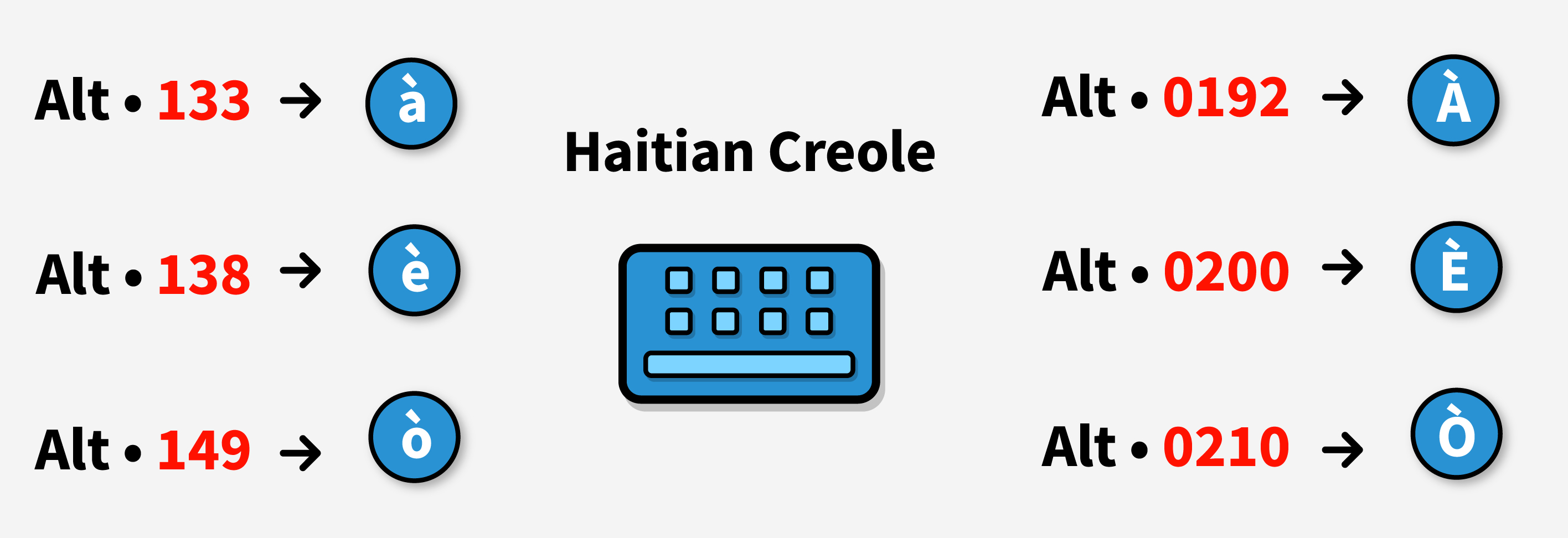
Haitian Creole accent marks keyboard shortcuts.
Focus Mainly on è and ò
As mentioned earlier, the letter à is very rare in standard Haitian Creole spelling.
So, focus on learning how to pronounce è and ò first.